




It is widespread nowadays among teens to hear them discuss or search the internet for free internet tricks on networks in Zimbabwe. We at Hippotechgroup have decided to provide our readers with one of the best tricks to surf the internet for free.
Recently, I had the opportunity to attend a workshop at the University of Harare and decided to spend time at my cousin’s place. While there, I overheard my cousin and his friends discussing a free internet trick that works on all networks in Zimbabwe. I was curious about this and decided to join them in their conversation to learn more.

I began to ask questions on how this trick works and how is it possible. The guy sharing this idea took his time to explain the process to me and even configured my phone. I was marvelled at the internet trick when it worked because i used to hear of these tricks but always thought it was a joke.
In this article, i will share this free internet trick for all networks in Zimbabwe step-by-step.
See Also: 6 Ways to Earn Money Online
How to Get Free Internet Trick for All Networks in Zimbabwe (Step-by-Step Guide)
Requirements for Free Internet Trick for All Networks in Zimbabwe
- Download the DroidVPN Application (Download Link)

- Apply the Droid VPN Configuration shown below.
- Your Smartphone should be an android device of minimum android version 5.0.1
- Get a SIM Card for any network in Zimbabwe and do not activate any data bundle or transfer credit to it.

Steps to Get Free Internet on All Networks in Zimbabwe
- Download the DroidVPN app via this LINK.
- Install the app and click to open it.
- Click and Select UDP mode.

- Click the three lines on the top left side of your screen and click settings.
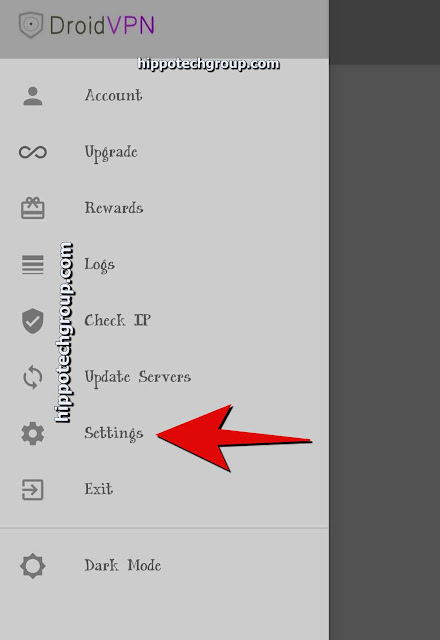
- Now select UDP settings and input the following configurations:


- Save the Configuration.
- Insert your Premium Account in the Account field.
- Click START to Connect and wait for the VPN to get Connected.
- Enjoy and browse the internet for free.


