



APN Configuration (Internet Settings) for Nexttel, Camtel, Yoomee, Orange, and Mtn Cameroon.
In Cameroon, it is common to get some internet subscribers to complain they don’t know the internet settings (APN Configuration) to the network they are using. Cameroon telecommunication network is covered by five leading companies, i.e., Nexttel, Camtel, Yoomee, Orange, and Mtn Cameroon.


All networks but for Yoomee provide call and SMS services via GSM. This article will look at the various internet settings (APN Configurations) of Cameroon’s networks.
Furthermore, we would add these settings on both Android and Apple (IOS) phones.
How to Create or Modify Your Internet Settings (APN Configuration)


- Go to Settings
- Mobile Networks
- Access Point Names (APN)
- Add New APN, then save.
- Mobile Data Network
These settings apply to both Android and iPhones.
1. APN Internet Settings Configurations for Nexttel Cameroon
After creating or modifying your APN Profile, you can add the following:


Name: Nexttel
APN: e-connect or n-connect or nexttelcm (Use only one)
Username: Not Set
Password: Not Set
Proxy : (leave it blank – not set )
Port : (Leave it blank – not set)
Server : (leave it blank )
MMSC : ( Leave it blank )
Multimedia Message proxy : (leave blank)
Multimedia message port : (Not Set)
MCC : (default) Number will be displayed automatically
MNC : (default) Number will be displayed automatically
Authentication type : (none)
APN type : (default,supl)
APN protocol : (IPv4)
Bearer : (Unspecified)
Mobile virtual network operator : (none )
After setting it up, make sure you save and activate your internet profile.
NB: These settings apply to Mobile and Wifi-routers.
2. APN Internet Settings Configuration for Camtel
- How to Set up APN Internet Settings Configuration on Phones Using Camtel Network
To set up your internet settings, apply the following after creating or modifying your APN:


Name: Camtel
APN: Camtel
Username: Not Set
Password: Not Set
Proxy : (leave it blank – not set )
Port : (Leave it blank – not set)
Server : (leave it blank )
MMSC : ( Leave it blank )
Multimedia Message proxy : (leave blank)
Multimedia message port : (Not Set)
MCC : (default) Number will be displayed automatically
MNC : (default) Number will be displayed automatically
Authentication type : (none)
APN type : (default,supl)
APN protocol : (IPv4)
Bearer : (Unspecified)
Mobile virtual network operator : (none )
For more, check out: Camtel internet bundles.
2. How to Setup APN Internet Settings Configuration on Router or Modem for Camtel Network.
Several types of Routers/Modems are used in Cameroon, but Huawei accounts for 90%. Thus, we will examine how to set up a Huawei router or MiFi. First, to set it up to apply the following settings:
- To begin, open a browser (Chrome, Firefox, Edge, etc.).
- Next, go to address and input 192.168.8.1 (or 192.168.1.1 for some Huawei models).
- Next, click Connection Settings and enter your Username and Password (Default the Username: admin and Password: admin).


- Click Profile Management

- Next up, click on New Profile.
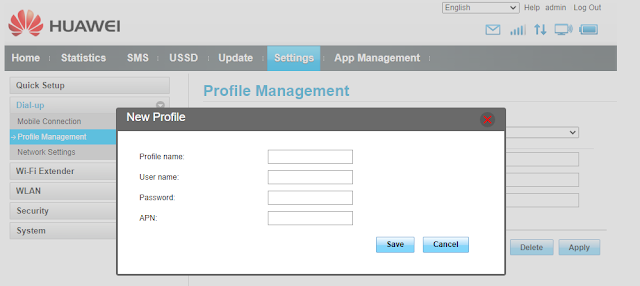
- Type Camtel in the Profile Name field and camtel in the APN name field.

- Click Save, and you are done.


3. APN Internet Settings Configuration for Yoomee
To set up your internet settings, apply the following after creating or modifying your APN:


Name: Yoomee
APN: yoomee
Username: Not Set
Password: Not Set
Proxy : (leave it blank – not set )
Port : (Leave it blank – not set)
Server : (leave it blank )
MMSC : ( Leave it blank )
Multimedia Message proxy : (leave blank)
Multimedia message port : (Not Set)
MCC : (default) Number will be displayed automatically
MNC : (default) Number will be displayed automatically
Authentication type : (none)
APN type : (default,supl)
APN protocol : (IPv4)
Bearer : (Unspecified)
Mobile virtual network operator : (none )
To set up your internet settings configuration on a modem or router, follow the steps on How to Setup APN Internet Settings Configuration on Router or Modem for Camtel Network. The profile field is type “Yoomee,” and the APN field input “yoomee” and click save.
See Also: How to Recharge Your Yoomee Account Online.
4. APN Internet Settings Configuration for Orange Cameroon.
After creating or modifying your APN Profile, you can add the following:


Name: Orange
APN: orange
Username: Not Set
Password: Not Set
Proxy : (leave it blank – not set )
Port : (Leave it blank – not set)
Server : (leave it blank )
MMSC : ( Leave it blank )
Multimedia Message proxy : (leave blank)
Multimedia message port : (Not Set)
MCC : (default) Number will be displayed automatically
MNC : (default) Number will be displayed automatically
Authentication type : (none)
APN type : (default,supl)
APN protocol : (IPv4)
Bearer : (Unspecified)
Mobile virtual network operator : (none )
Also, to set up your internet settings configuration on a modem or router, follow How to Setup APN Internet Settings Configuration on Router or Modem for Camtel Network as mentioned above. Type “Orange” and the APN field input “orange” and click save in the Profile field.
Also, check out: Orange Giga Morning (1GB at 250 frs)
4. APN Internet Settings Configuration for Mtn Cameroon.
After creating or modifying your APN Profile, you can add the following:


Name: Mtn
APN: internet
Username: Not Set
Password: Not Set
Proxy : (leave it blank – not set )
Port : (Leave it blank – not set)
Server : (leave it blank )
MMSC : ( Leave it blank )
Multimedia Message proxy : (leave blank)
Multimedia message port : (Not Set)
MCC : (default) Number will be displayed automatically
MNC : (default) Number will be displayed automatically
Authentication type : (none)
APN type : (default,supl)
APN protocol : (IPv4)
Bearer : (Unspecified)
Mobile virtual network operator : (none )
Besides, as mentioned above, to set up your internet settings configuration on a modem or router, follow the steps to set up APN Internet Settings Configuration on Router or Modem for Camtel Network. Then, in the Profile field, type “Mtn” and the APN field input “internet” and click save.
On Mtn Cameroon Network, the fastest way to configure your phone is to send the word “WEB” to 7123.
NB: These settings apply to both Android and iPhones.


